
版本更新
根据不同的部署方式,使用不同的更新方式。请注意更新之前请先检查公告和兼容性更新日志,处理完所有兼容性问题后再进行更新。
Cloudflare Pages 部署
自动更新
仓库内置了 Upstream Sync Action(每日自动同步上游更新),启用 Upstream Sync Action 和仓库的 issues 功能后,上游仓库有更新时会自动同步并触发部署。如果遇到需要您手动处理的情况时,会创建新的 issue 来进行说明。
启用 Upstream Sync 和 issues
Action 启用方式:进入 Fork 仓库的 Actions 页面,找到 Upstream Sync,点击 Enable workflow。 issues 功能启用方式:进入 Fork 仓库的 Settings 页面,点击 General,在 Features 中勾选 Issues。
手动更新
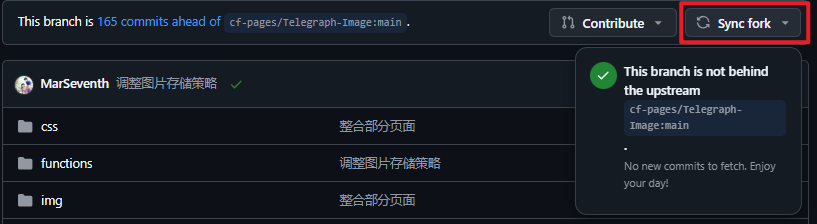
- 进入您 Fork 的仓库
- 点击 "Sync fork"
- 选择 "Update branch"
- Cloudflare Pages 将自动重新部署
Cloudflare Workers 部署
自动更新
仓库内置了 Upstream Sync Action(每日自动同步上游更新),启用 Upstream Sync Action 和仓库的 issues 功能后,上游仓库有更新时会自动同步并触发部署。如果遇到需要您手动处理的情况时,会创建新的 issue 来进行说明。
启用 Upstream Sync 和 issues
Action 启用方式:进入 Fork 仓库的 Actions 页面,找到 Upstream Sync,点击 Enable workflow。 issues 功能启用方式:进入 Fork 仓库的 Settings 页面,点击 General,在 Features 中勾选 Issues。
手动更新
- 进入您 Fork 的仓库
- 点击 "Sync fork" 同步上游更新
- 同步完成后会自动触发部署;也可以进入 Actions 页面手动运行 Deploy to Cloudflare Workers
Docker 部署
Docker Compose 更新
bash
# 拉取最新镜像
docker compose pull

# 重启服务
docker compose up -d
Docker 命令更新
bash
# 拉取最新镜像
docker pull marseventh/cloudflare-imgbed:latest

# 运行容器
docker run -d \
  --name cloudflare-imgbed \
  -p 7658:8080 \
  -v $(pwd)/data:/app/data \
  -v $(pwd)/wrangler.toml:/app/wrangler.toml \
  marseventh/cloudflare-imgbed:latest
手动部署
拉取最新代码,重新构建并部署:
bash
git pull
npm install
npm run start